

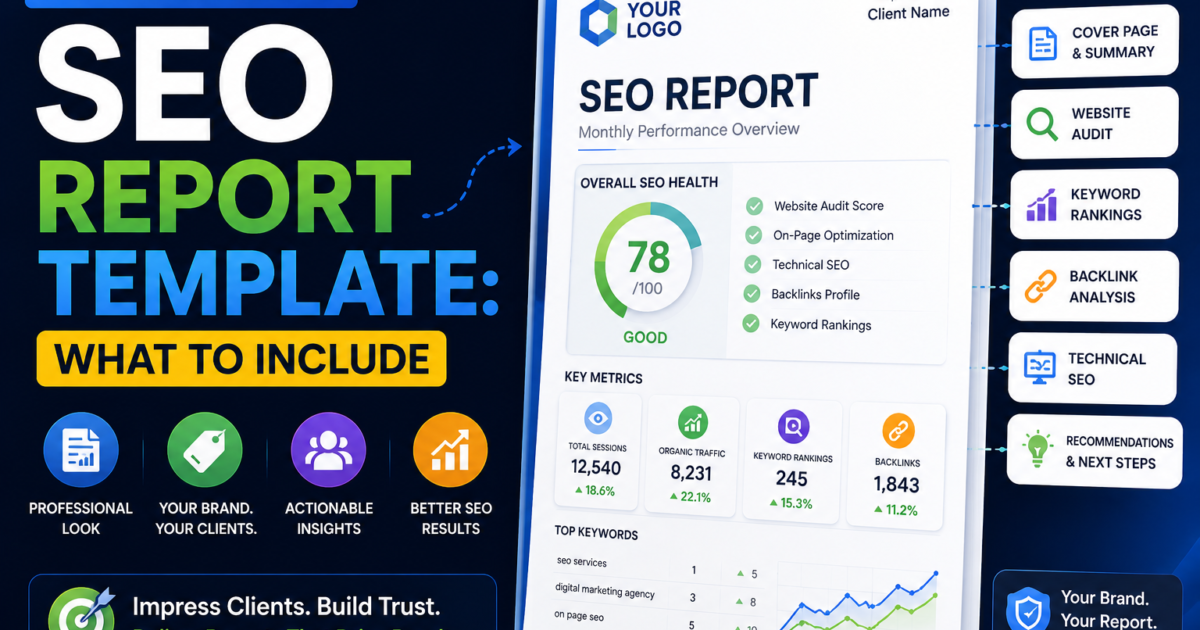
Most white label SEO reports fail for the same reason: they’re built to show the agency did work, not to show the client what changed and why it matters. Clients don’t renew because a report looks polished. They renew because they understood what happened to their business.
This breaks down exactly what belongs in a report that actually keeps clients, section by section, in the order it should appear.
📖 This article is part of our complete guide to white label SEO reporting — see it for the full toolset and free report generator.
Why most templates fail
Two failure patterns show up constantly. The first is the vanity metrics report — pages of keyword position changes and traffic graphs with no explanation of why any of it happened or what it means for the client’s actual business (leads, sales, calls). The second is the wall of data report — 40 pages of raw numbers with no summary, forcing a busy client to either trust it blindly or ignore it entirely.
A report that keeps clients does three things every single time: leads with what changed in plain language, shows the data that backs it up, and tells the client what happens next. Everything below follows that order.
Section 1: Executive summary
This is the only section most clients actually read closely, so it carries the most weight. It should fit on one page and answer three questions: what improved, what didn’t, and what you’re doing about the part that didn’t.
Write it in plain business language, not SEO jargon. “Your website showed up in search results 18% more often this month, which usually leads to more calls and form submissions” lands better with a client than “impressions increased 18% MoM.”
Section 2: Rankings and visibility
Show keyword position changes, but group them by business intent rather than listing every tracked keyword alphabetically. Separate “keywords that drive leads” from “keywords that build general visibility” so the client can see progress on what actually matters to their revenue, not just movement on vanity terms.
Include a short trend line or chart rather than a raw table wherever possible — visual movement over time communicates progress faster than a list of numbers a non-technical client has to interpret themselves.
Section 3: Traffic and engagement
Organic traffic, but paired with what that traffic actually did: form submissions, calls tracked, or add-to-cart events if e-commerce. Traffic without an outcome attached is exactly the kind of vanity metric that erodes client trust over time, since it doesn’t answer “so what does this mean for my business.”
If you have last month’s zero-click data available (see our Zero-Click Search guide for context), it’s worth a short note here when impressions rise but clicks stay flat — clients increasingly ask about this, and getting ahead of the question builds trust.
Section 4: Technical health
A brief Core Web Vitals summary and a short list of any technical issues found and fixed. This doesn’t need to be exhaustive — a simple pass/fail or score-based summary works better for a non-technical audience than a full crawl report. Link out to a full technical report as an appendix if the client wants the detail.
Section 5: Work completed this period
A specific, dated list of what was actually done — content published, backlinks earned, technical fixes shipped, pages optimized. This is the section that justifies the invoice, so be concrete rather than generic. “Optimized 4 service pages for local intent” beats “ongoing SEO optimization work.”
Section 6: Next period’s plan
Two to four specific priorities for next month, tied to the results shown above. This is what turns a report from a look-back into a forward-looking conversation, and it’s the section that sets up the renewal conversation naturally instead of needing a separate pitch.
What to leave out
Raw keyword lists with hundreds of rows. If a client wants the full data, link to a live dashboard or attach it as an appendix — don’t make it the centerpiece.
Unexplained jargon. Terms like “domain authority,” “crawl budget,” or “canonical tags” mean nothing to most clients without a one-line explanation attached the first time they appear.
Competitor comparisons with no action attached. Showing a client they’re behind a competitor without a specific plan to close the gap creates anxiety without value.
How to generate one free
Building this structure manually every month for every client doesn’t scale for a solo operator or small agency. SEO Inspector Hub’s white label SEO report generator builds a client-ready report with your own branding, covering the sections above, without you having to assemble it by hand each cycle.
Frequently Asked Questions
How long should a white label SEO report be?
There’s no fixed length, but the executive summary should always fit on one page regardless of how long the full report runs. Most effective client-facing reports run 4-8 pages, with any deeper data available as a linked appendix rather than inline.
Should I show clients the exact tools I use?
It’s generally fine to name the categories of tools you use (rank tracking, technical auditing) without necessarily disclosing your exact stack, especially for white label tools where the branding in the report is your own rather than the underlying vendor’s.
How often should I send white label SEO reports?
Monthly is the standard cadence for most retainer-based SEO work, though some agencies supplement with a shorter weekly update for active campaigns or a quarterly deeper review alongside the monthly summary.
What’s the difference between a white label report and a branded report?
A white label report carries the reselling agency’s own branding with no mention of the underlying tool or vendor, while a branded report displays the tool provider’s name and logo. Clients generally trust white label reports more because they read as coming directly from their agency of record.
Conclusion
A white label SEO report that keeps clients isn’t the one with the most data — it’s the one that answers what changed, why it matters, and what happens next, in that order, in language a non-technical client can act on. Build the template once around that structure and every report after becomes faster to produce and more likely to earn a renewal.

![Free White Label SEO Audit Tools: Honest Comparison [2026]](https://seoinspectorhub.com/blog/wp-content/uploads/2026/06/Free-White-Label-SEO-Audit-Tools-800x450.png)